Trial Period
Deratix offers a 30-day free trial with full access to all Premium features. No credit card or commitment is required.
What does the trial include?
| Parameter | Value |
|---|---|
| Length | 30 days |
| Features | All Premium features |
| Users | Up to 15 |
| Protocols | Unlimited |
| Clients | Unlimited |
During the trial, you have access to all features, including the client portal, activity log, color tags, document management and priority support.
Registration
- Go to the registration page on deratix.com (or deratix.sk / deratix.cz)
- Click Start trial
- Fill in the registration form:
- Company name — the official name of your company
- Email — admin contact email (it will be used as your login)
- Application address — a unique subdomain (for example
yourcompany.deratix.com)
- Accept the terms and conditions
- Click Register

Email verification
After submitting the form, you will receive a verification email. Click the link in the email to confirm your registration.
Tip: If the email does not arrive within a few minutes, check your spam folder. On the registration page, you can click Send again to resend it.
First login
After your email is verified, your application is prepared automatically. Wait for the welcome email with a link to set your password:
- Click Set password in the welcome email
- Enter your new password
- Sign in at
yourcompany.deratix.com
Note: Application setup usually takes 1-2 minutes. The welcome email is sent automatically when it is finished.
Then continue with the initial setup guide.
Trial timeline
| Day | What happens |
|---|---|
| D0 | Registration — full access to all features |
| D16 | Email reminder — 14 days remaining |
| D23 | Email reminder — 7 days remaining |
| D30 | Trial expires — [[expiration |
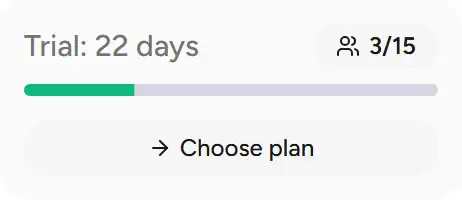
During the trial, the app shows a countdown widget with the number of days remaining:
- On desktop — in the sidebar
- On mobile — on the dashboard
Before the trial ends
Before your trial expires, we recommend that you:
- Choose a plan — see the plans comparison
- Upgrade to a paid plan — follow the upgrade guide
- Export your data — if you decide not to continue, export your data
Important: After the trial expires, a 7-day grace period begins. During that time, your data is available in read-only mode. See the expiration section for details.