One client, three sites, and a different person at each one. One location handles servicing, another receives protocols, and the third has its own phone number and email. If all this information is stored only at the company level, sooner or later the same thing happens: the technician calls the wrong number, the office sends the protocol to the wrong email, and someone has to fix it manually.
That is why Deratix brought site management closer to reality. Each address can have its own contact, and over time it has also become a natural place for protocols, documents, and other records tied to a specific location.
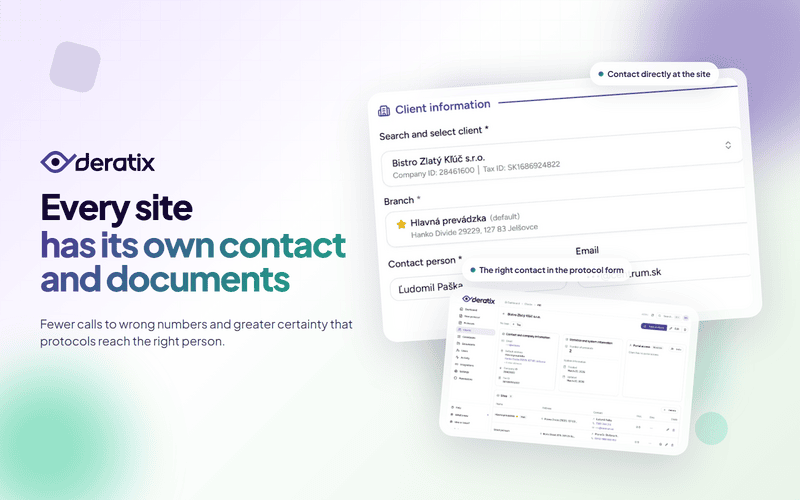
Each site can have its own contact
This change makes the most sense for companies with multiple branches, warehouses, or operational sites. The headquarters may be one place, but the person who lets you in, receives the protocol, or handles servicing is usually someone different at each location.
That is exactly why the contact is no longer stored only at the client card level. It is assigned directly to the site where you actually need it.
- Fewer mistakes when calling before a visit or during a service intervention.
- More accurate data in the client database, with each site carrying its own contact.
- Better organization for larger clients, where a single company card is not enough.
The correct contact loads automatically in the protocol form
The real practical benefit is not just that contacts can be recorded. What matters is that they are then used seamlessly when creating a protocol.
When you select a client and a specific site in the form, Deratix loads the contact person, email, and phone number directly from that address. You do not have to retype them for every intervention, and you do not have to wonder whether the record still shows an outdated person or an old number.
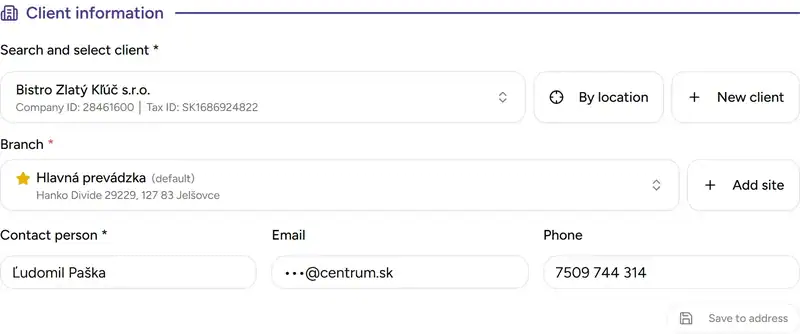
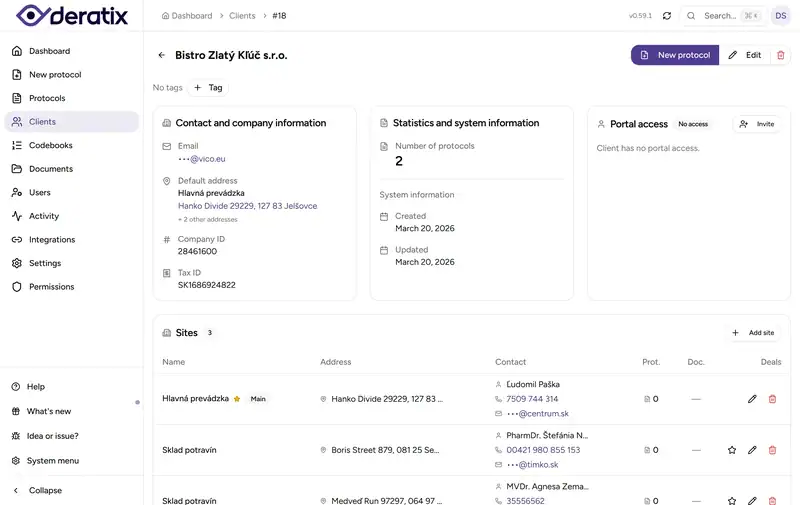
A site is no longer just an address — it is a working context
Later, site management was expanded to include a clearer client detail view and more independent work with individual locations. This matters because for larger clients, it is not enough to know where the technician is going. You need to have protocols, documents, and other records gathered at the specific site.
In practice, this means you no longer work only with the company card as a whole. You open a specific location and deal with exactly what relates to that address.
Less room for error when sending protocols
This change did not just help with phone numbers and names. It also improved the actual sending of protocols.
In practice, this means:
- you can route the protocol to the site’s email, not just the general company address,
- the company email is also available for internal records or archiving,
- when resending, you have a better overview of who the protocol was originally sent to and whether the contacts have changed since then.
This is especially important for clients where addresses and contacts change frequently. Instead of the protocol quietly ending up in the wrong person’s inbox, you have greater control over where it actually goes.
A real-world example
Imagine a client with headquarters in New York, a warehouse in Chicago, and a production facility in Houston. The technician goes to the warehouse, but after the intervention the site manager in Chicago needs to receive the protocol. At the same time, the company wants to keep a copy on a shared company email.
Without site-level contacts, it is easy for the technician to call the headquarters, for the office to send the protocol to the general address, and for the right person to receive it too late. With the new approach, you select the specific site, the correct contacts load automatically, and when sending you know exactly where the document belongs.
What matters most
The biggest benefit of this change is not that more fields were added to the client detail. What matters is that a site stops being just an address in a list.
It has its own contacts, its own documents, and its own context for day-to-day work. This reduces the small everyday mistakes that unnecessarily cost time for both the office and the technicians.
If you would like to explore this feature in more detail, check out client management, creating a protocol, client detail, and notifications.