A technician arrives on site and needs to get started as quickly as possible. That is exactly when even a small thing can cause unnecessary delay: searching for the right client in a list, double-checking an address, or wondering whether to open the client detail or jump straight into a new protocol.
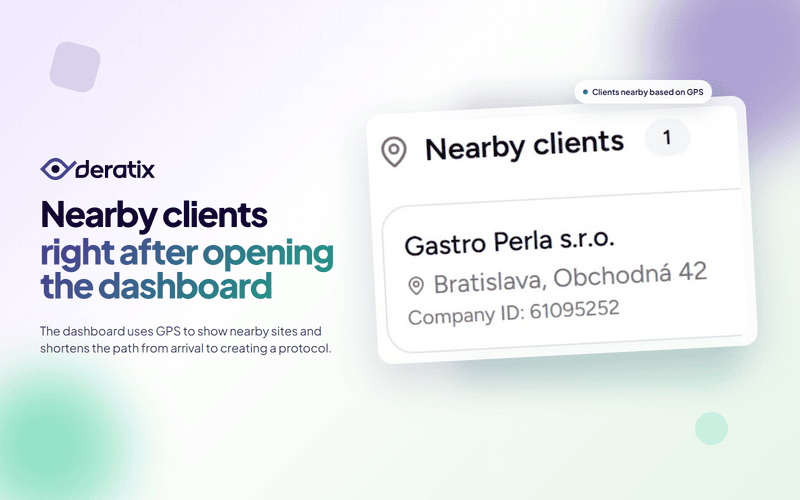
Deratix now shows nearby clients directly on the Dashboard. When the app opens, the system requests your location and displays nearby sites. In practice, this means that instead of searching manually, the technician immediately sees a selection of clients that make the most sense given their current location.
When the app knows where you are
This feature helps most in situations where a technician is working in the field and needs to get oriented quickly after arriving on site. It is not a map for the sake of having a map. It is about making sure those first few seconds after arrival do not turn into unnecessary clicking.
If a client has GPS coordinates entered for a site in the database, Deratix can use the current location to suggest addresses that are nearby. The technician does not have to think about what name the site is listed under or whether it is the headquarters, a warehouse, or a specific branch.
This is especially useful when:
- a company has many sites in the same city,
- the technician is navigating by address rather than company name,
- work needs to start immediately upon arrival.

Less searching, faster start to the job
The real benefit is not just that clients “pop up” on screen. What matters is what you can do right after.
For each client found, you have two quick options right there:
- open the client detail, if you need to review information or addresses,
- create a new protocol, if you want to start working immediately.
That is precisely the difference between a feature that looks good and one that actually saves time in the field. After arriving, the technician does not have to navigate through additional screens just to get to what they already know they came to do.
Helpful even where clients are close together
This feature is particularly practical in cities, shopping centers, industrial parks, or streets where a company has multiple clients within a short distance of each other.
Those are exactly the situations where it is easy to mix up a site or accidentally open the wrong client. When the system only shows nearby addresses, the technician makes decisions from a narrower, more logical selection.
The result is:
- lower risk of starting a protocol for the wrong client,
- faster orientation in areas with a dense network of sites,
- a more comfortable start to the job without unnecessary clicks.
It only works when addresses are set up properly
This feature also naturally highlights why it pays to have well-maintained addresses and GPS coordinates for clients and their sites.
When a company keeps its client records accurate, the Dashboard transforms from a basic home screen into a practical starting point for field work. The better the client records are configured, the more useful this card becomes for technicians in the field.
So it is not an isolated feature. It is the result of a well-maintained client database.
A real-world example
Imagine a technician heading out in the morning to a shopping center. In a single building or the surrounding area, the company has multiple sites, and similar-sounding client names might not mean much at first glance.
Without this feature, the technician opens the app, starts searching manually, compares addresses, and only then finds the right client. With the nearby clients card, the Dashboard immediately shows sites in the area after opening, and a single tap opens the detail or a new protocol. That is exactly the kind of small difference that, with repeated field visits, adds up to noticeable time savings.
What it means for the company
Nearby clients on the Dashboard are not just an add-on GPS feature. They help shorten the path from arriving on site to getting real work done.
For technicians, it means a faster start to the job. For the office, it means a lower risk of work being done on the wrong client. And for the company, it means better use of the client database, one that helps technicians not just with administration but directly in the field.
If you want to explore this feature in more detail, take a look at GPS geolocation, client management, the Dashboard, and the client database.