Skip to content

Photo documentation

Take photos directly from the app, add a description, and the photo becomes part of the protocol. Up to 20 photos per service.

Deratix Photo documentation — desktop application screenshot showing the feature in action
Deratix Photo documentation — mobile app view with touch-optimized interface

Features

Photos from the field

Phone camera, gallery or drag-and-drop from computer

Overall site condition

Separate section for a visual record of the service progress

Caption for each photo

What the image shows and where the issue was found, displayed directly in the PDF

Drag to reorder

Photos appear in the PDF exactly as you order them

Three deficiency categories

Organizational, structural and hygienic, each with its own photos, evaluated separately

Part of the PDF protocol

With captions, orientation handling and your chosen order

Automatic optimization

Converted to an efficient format without quality loss and without any configuration

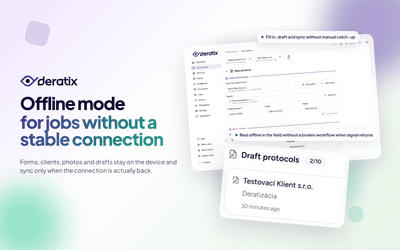
Works offline too

Photos are saved on the device and uploaded automatically after connection

Deletion protection

Confirmation before every deletion, no photo is accidentally removed

Real-world examples

Photos are part of the protocol, not separate files

An inspector requests photo documentation from the last service. The manager opens the protocol and all photos are there — with captions, in order, in the context of the service. Photos are added to the protocol directly during filling and remain an inseparable part of it. When anyone opens the protocol later — in the app or as a PDF — the photos are exactly where they should be.

Add context to every photo that holds up during an inspection

The technician photographs a damaged door threshold and immediately notes what the image shows and exactly where the issue is. The caption appears directly below the photo in the PDF. When the client or inspector opens the document months later, they see not just the image but its explanation — without needing to contact the technician or search through notes.

Sort deficiencies into three categories — each with its own photos

Gaps in doors are a structural deficiency. Missing records are organizational. Contamination behind shelves is hygienic. Each category is assessed separately in the protocol and has its own photo documentation with captions. In the PDF the client sees exactly what falls under their responsibility — with visual evidence for each type. Systematic deficiency records provide a basis for concrete actions, not just a formal entry.

You decide the photo order — drag on phone or computer

You want to order photos by the sequence of the service, by severity or by room. Drag them into the desired order and they appear exactly that way in the generated PDF — with captions and with orientation handling so portrait and landscape photos both look good.

No signal — you shoot the same way — upload happens automatically later

Basements, underground storage, production halls — no signal. Photos are saved directly on the device and remain part of the draft protocol. After connecting to the internet they are uploaded automatically. If the upload fails the app tries again. The full offline mode works completely — including photos, signatures and all protocol data.

Photos are automatically optimized — no setup, no quality loss

Every photo is automatically resized and converted to an efficient format after upload. The result is faster protocol loading and smaller PDF files. Everything happens in the background. And before deleting a photo the app always confirms — an accidental tap removes nothing.


Blog

Protocols can be corrected, reviewed, and revised — anytime after submission
New features
v0.60.0

Protocols can be corrected, reviewed, and revised — anytime after submission

A submitted protocol doesn't have to be final. A manager can reopen it, return it to the technician for corrections, or review it before it reaches the client. Each of these options can be enabled based on what the company actually needs.

March 27, 2026 6 min
A digital protocol for the entire service intervention
New features
v0.51.0 v0.58.3 +1 more

A digital protocol for the entire service intervention

Client, site, materials used, photo documentation, signatures, and final delivery all stay in a single record. Technicians no longer need to piece together the result from notes, attachments, and manually tracked data.

January 9, 2026 7 min
Complete the protocol even when signal drops
New features
v0.49.0 v0.14.0 +5 more

Complete the protocol even when signal drops

The technician finishes the form, photos, and signatures on site. The in-progress protocol stays on the device and syncs automatically once connectivity is restored — no manual re-entry needed.

January 3, 2026 4 min
Photo documentation with location, descriptions, and ordering
New features
v0.41.0 v0.8.0 +1 more

Photo documentation with location, descriptions, and ordering

Field photos stay attached to the protocol, complete with descriptions, ordering, and placement in the PDF. Technicians don't have to shoot photos into a separate gallery, and the office doesn't have to sort them later from emails and shared folders.

December 13, 2025 6 min
Deficiency Tracking with Descriptions, Photos, and History
New features
v0.6.0 v0.41.0 +2 more

Deficiency Tracking with Descriptions, Photos, and History

Organizational, structural, and hygiene deficiencies are recorded separately, each with its own description, photos, and traceability in protocol history. Records no longer get buried in a single general note.

November 27, 2025 5 min

Stay in the loop

Be the first to know about updates and improvements.

By subscribing, I agree to email processing for newsletter purposes. I can unsubscribe at any time.