Skip to content

Client portal

Invite the client to the portal and they can download the necessary documents themselves. No calls needed, no archive searching.

Deratix Client portal — desktop application screenshot showing the feature in action
Deratix Client portal — mobile app view with touch-optimized interface

Features

Self-service access

Clients download protocols, PDFs and documents themselves without calling or emailing

Protocols by locations

List of all interventions at client's addresses, chronologically

PDF download

Protocol in company design directly downloadable from the portal

Safety data sheets

SDS from materials used in protocols over the last two years, automatically

Shared documents

Contracts, maps and attachments assigned to locations visible to the client

Multiple companies per account

Client with access to multiple companies sees them all in one place

Simple invitation

Invite client with one click, they receive an email with a password setup link

Access management

Revoke invitation anytime, client loses access immediately

Real-world examples

Self-service access for your clients

Invite a client to the portal with one click. They get access to an overview of all services performed at their sites. No calls, no searching the archive — the client finds what they need themselves.

Protocol and document overview

The client sees a list of all protocols at their addresses, can download PDFs and view attached safety data sheets. Everything clearly organized by site.

Secure and controlled access

The client sees only their own data — no information about other clients or your company's internal operations. You can revoke access at any time.

  • Simple client invitations by email
  • PDF protocol download directly from the portal
  • Access to safety data sheets for materials used
  • Works on mobile and desktop

Blog

Handle hundreds of client documents with a single ZIP file
New features
v0.61.0

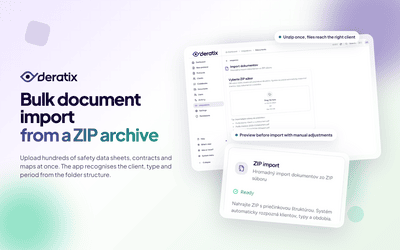
Handle hundreds of client documents with a single ZIP file

Instead of uploading files one by one, you unpack the whole archive at once. The app recognises the client, document type and period from the folder structure, and you only review the preview before saving.

May 12, 2026 6 min
Protocols can be corrected, reviewed, and revised — anytime after submission
New features
v0.60.0

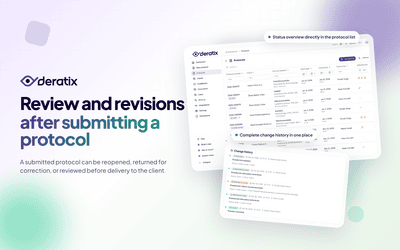
Protocols can be corrected, reviewed, and revised — anytime after submission

A submitted protocol doesn't have to be final. A manager can reopen it, return it to the technician for corrections, or review it before it reaches the client. Each of these options can be enabled based on what the company actually needs.

March 27, 2026 6 min
Client portal for protocols, documents, and service locations
New features
v0.58.0 v0.44.0 +2 more

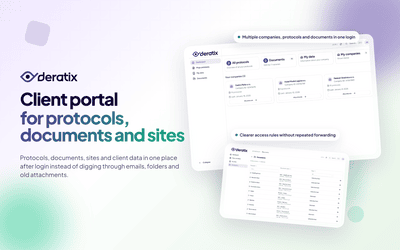
Client portal for protocols, documents, and service locations

Protocols, documents, service locations, and basic client information are all available in one place after logging in. Your office no longer needs to repeatedly track down the same attachments or manage shared access outside the system.

February 10, 2026 7 min
Documents without digging through emails and folders
New features
v0.58.0

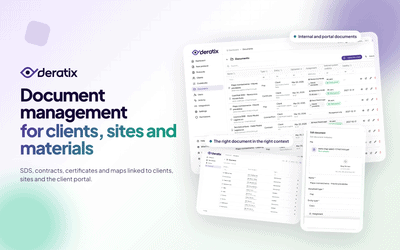
Documents without digging through emails and folders

SDS sheets, contracts, certificates, and maps are stored with clients, sites, and materials. The client portal also automatically displays SDS sheets for materials that have been uploaded and appeared in protocols within the last 24 months.

February 10, 2026 5 min
A digital protocol for the entire service intervention
New features
v0.51.0 v0.58.3 +1 more

A digital protocol for the entire service intervention

Client, site, materials used, photo documentation, signatures, and final delivery all stay in a single record. Technicians no longer need to piece together the result from notes, attachments, and manually tracked data.

January 9, 2026 7 min

Stay in the loop

Be the first to know about updates and improvements.

By subscribing, I agree to email processing for newsletter purposes. I can unsubscribe at any time.